Monday, June 30, 2014

What Would You Have Done?


What Would You Do?

If you were confronted by a team of camera men, producers, directors, and light and sound technicians outside your classroom door one day as you reported for work, saw all of their equipment attached to cables snaking through your classroom and out the door, what would you do? Would you want to be their “star?”

View Outside My Adult Education Classroom


We had been told that a film crew was going to be at our site, and that they would be popping into various classrooms to film teaching in progress. No biggie, as we were all used to impromptu evaluations, and had been visited and photographed by District personnel at various times in our careers.


One of the Many Equipment Tables


So I was surprised when I arrived at work this day to find the film crew parked outside, inside, and in the doorway of my Adult Education classroom. I was even more surprised to be asked if I would like to follow their script and “teach” while they filmed me, or would I prefer that they use their own “actor?”

Setting Up Equipment


I had only started teaching Adult Education classes three weeks previous to this question. The video they were going to film would be shown to the entire state at conferences as an example of “best practices” in an Adult Education setting. I hadn’t even attended a single in-service training for this job yet, and I was one of the two newest staff members on the team. I also suspected that the reason they chose me was due to the fact that I had the largest room, not because they thought I was an expert on teaching adults.

Beginning to Feel Out of My Depth


Feeling out of my depth, I politely declined. Then I sat at my computer working on a PowerPoint for my class while the film crew spent the next three-and-a-half hours in my classroom. They ended up asking two of the other experienced teachers on staff to be their “actors.” Both were asked to repeat the same lines over and over again while the crew filmed from various angles.

The "Bright Lights"


Afterward, our principal provided pizza and beverages for all, while the film crew conducted personal interviews with many members of my class. I ended up teaching a handful of my students (without the film crew) for only about 15-20 minutes that day. It was a very strange day.

What about you? Would you have accepted or declined the invitation to be a “star” in these circumstances? Would you have basked in the limelight, or run screaming down the hall (as I was tempted to do)? I would love to hear what you have to say.

Until then,


post signature

Saturday, June 28, 2014

Getting Ready for the Conference

At last it came time to put all my Louisiana SDE conference materials together and get them shipped to Jennifer of  4MulaFun.

First, I stapled my business cards to the small packages containing the flower seeds and labels. If I had to do this over again, I think I might buy a little bit larger bags so that the card could go inside with the seeds. I do like the insert, though, and it does have my name and website on it again, so I’m not sure. What do you think?

Carol's Garden Business Card with Seeds and Insert

Next, I counted out 50 of the card/seed packet combos and bundled them inside a large Ziploc baggie. I did this eight times to make 400 all together.

Business Cards with Seeds/Inserts in Baggies of 50 Each

My laminated task card sample was wrapped in tissue paper and placed in a tiny box I had left over from something I received in the mail. I put both the task cards and the Ziploc baggies of business card/seed packets in one large FedEx box.

Laminated Measurement Task Cards Sample with QR Code

I wrapped my product book in bubble wrap, then placed it inside another large FedEx box.

Business Crds with Seeds/Insert, Product Book, and Task Cards

Finally, I went down to FedEx Kinkos and mailed both boxes to Jennifer. She received them a few days later, and I waited for the conference.

Here’s a photo Jennifer posted showing our products at the conference. My product book is lying on the table on the right-hand side, and my task cards are hanging from a small display tree at the front. You can’t see my business cards/seed packets combo, because they’re inside the white goodie bags at the back left of the table.

Louisiana SDE Teachers of TpT Conference Table
Jennifer barely had time to take this photo. The conference display was so popular with attendees that all 400 goodie bags were gone THE FIRST DAY of the three-day conference. She said that teachers were screaming with excitement when they saw all the cool stuff inside the goodie bags! Wish I could have been there. :D

If you want to see the stores and blogs of the other TpT sellers who participated in this conference, check out Jennifer's Teachers of TpT blog here.

If you liked this post or have any questions, PLEASE leave feedback. You rock!

Have a wonderful week!
post signature

Monday, June 23, 2014

Filling My TpT Product Book (with Video)


Once I had the front cover and table of contents complete, and the template theme saved, I was ready to fill the pages with my products. Looking at my table of contents, I started with the first section, “Math,” which is the largest section in my TpT store.

Since I created these products as I needed them, I started with the earliest sets and worked my way forward in time. I opened the file containing all of the thumbnails for one product at a time. Then I copied, pasted, shrunk, and arranged them on the page. Since I knew I would have the book bound at the top, I made sure to leave plenty of empty space at the top of each display page. I played around with the design a LOT over the next few weeks, but finally settled on what you see here, minus  the QR code and standards, which I added later. I spent weeks making a page for each of the sixty products in my store, minus the freebies, which need no advertisement. J


Next, I went back and added a QR code for each product. I don’t know why I had always been so intimidated by QR codes! They are so easy to make, once you know how. However, I am not very good at following written directions. I need visuals to follow. Once I had that, and some time to play around and make plenty of mistakes, I had that “Aha!” moment when I realized that the entire process was much easier than I had thought! (I promise to write about creating QR codes on a later blog post. Make sure to check back later. J)

Then I added the Common Core State Standards covered by each product to its own page. You can find the standards listed here. Jennifer (the conference host) had said in one of her posts that teachers at the conferences were very interested in this information, and I wanted to make it easier for them to find it.

Finally, I added a page to show teachers how to contact me, through my TpT store, Facebook page, blog, or email, and reminded them that I take requests. 


I checked over the entire book several times before saving it to a flash drive and taking it to Staples for printing, laminating (for durability) and binding. I also took along a PDF version of one of my task card sets so that it could be used on the display table.

Here’s a video to show the finished book:


You can also view this video on YouTube.

I hope you enjoyed seeing it! Please click on one of the icons below to “Like” or “Share” this post, or make a comment in the box below it. Then make sure to come back next time when I show all three of the finished items before shipping them off to the conference host!

Thanks for visiting! Until next time!

Have a fabulous week!

post signature

Wednesday, June 18, 2014

Designing My TpT Product Book for the Teaching Conference


Kind of like grading writing assignments, this project would be huge, which is why I procrastinated and left it for last.

Once again, I browsed through sample photos (and videos) created by other TpT sellers showing their own product books. Each of them was so professional looking! Because I already had my store logo and business card design (Thanks again, Catia Dias!) I wasn’t as intimidated by this assignment as I had been in the beginning.

Looking at the samples, I knew I wanted to keep the following things in mind while designing my product book.

1.     It needed to have the same “brand” as my other items. This meant that it would need to match my store logo and business card.
2.     My products would need to be highlighted in a way that would grab the attention of possible buyers at the teaching conference. That meant I would only have a few seconds to impress them, so I decided I would emphasize the visual aspects of my products rather than text.
3.     Everybody has a smart phone these days. I wanted to include a QR code for every product so that impulse buyers could quickly scan the code to locate the products and read the descriptions on the site.
4.     Make it last. This product book could end up going to many conferences, and be handled by thousands of teachers. I would need to make it durable enough to withstand the wear and tear of this kind of use.
5.     Get it done and shipped on time. This was a huge undertaking, and would take weeks to complete. I looked at a calendar to find out when Jennifer needed the book, then worked backward from there to figure out shipping time. Once I had a deadline for completing the project I was able to come up with a schedule for keeping myself on task and on time. I figured out how many pages I would need to complete every day. I could do more than that if I wanted to, but never less. In this way, I was able to finish early, without too much stress. I hate worrying about being late for anything.

The first thing I did was design the product cover. Using the business card which Catia had designed for me, I started with the front of the card, then added part of the back of the card to the bottom of the picture. This way I had all the information in one place. Then I added the burgundy border to the slide template.


Next, I started a table of contents. I wanted some kind of order to the displays, and wanted to give teachers a small indication of the types of products they would find inside. I kept the same background and color theme as the cover, so that all the pages of the book would match.


That’s all I have time for today! Thank you for reading. J I hope you will "Like" or "Share" this post, or leave a comment in the box below it. Please come back next time to see what I put inside my product book!

Until then! Have a terrific week!
post signature

Friday, June 13, 2014

Designing My Business Cards for the Conference

Part of advertising my TpT store at the teaching conference would involve giving out my business cards. Since I didn’t HAVE any business cards yet, I knew this would be a problem!

First, I browsed through the photos of business cards created by other teacher-sellers on our group’s Facebook page. Since it had been many years since I had even glanced at a business cards, I was surprised by the amount of color on each card, and by how each design was vastly different than those of the other sellers. I also read several posts in which sellers recommended either GotPrint or Vista Print as quality makers of business cards, so I decided to check them out.

I started with GotPrint and found the site was easy to use. They have many stock backgrounds which the user may use free of charge, but there were few font choices. I started with a flowery background, added text boxes for my store information, included my logo and store quote, then saved and posted it to the group FB page.


The response was underwhelming, LOL! The card and fonts were too busy. My next try looked like this:


The group suggested I design the card in a different program (for more design options) before uploading it to the site. Unfortunately, I use PowerPoint to design my products, and the program does not save in a high enough resolution to upload the result for a business card. Another seller offered to take whatever I designed and then complete it in a graphics program.

With this in mind, I decided to start over. My next card was much simpler, but lacked professional polish, and didn’t have my store quote on it. It did, however, have my QR codes. Here it is, front and back:

Third Try, Front

Third Try, Back


No sooner had I posted this latest attempt to the group Facebook page than Catia Dias from Always a Teacher Forever a Mom sent me a message to quickly check my inbox. When I opened my email, I couldn’t believe what I was seeing!

 
Business Card Design by Catia Dias

It was as if Catia read my mind! The new design was perfect, and so professional! I asked if she would mind adding the QR codes for my various websites, which she did! The next email from her contained the design for the back of the card, too! 

Design by Catia Dias


She even checked to make sure the design would work with Vista Print, which it did! I placed my order with Vista Print the same day, and my new business cards were on their way to me a few days later. Thank you, Catia!

Of course, that meant that I needed to get to work on my product book, the largest assignment of all the ones on Jennifer’s list. I’ll write more about that next time. J

Thanks for reading about my adventure! Please take a moment to click on one of the icons below this post to “Like” or “Share” it, or leave a comment or question. I love feedback!

Until next time, have a fabulous week!
post signature

Saturday, June 7, 2014

Conference Goodie Bag Item (Part 2)

Last time, I was in the middle of creating a goodie bag for teachers at a conference. I had scoped out seed companies and chosen U.S. wildflowers for their universal appeal and easy growing habits. It was getting late, so I went to bed. When I went back the next day, the seed was no longer on sale, and was almost double the price it had been! L

What was I going to do?! I couldn’t afford that price! Besides, I was really set on wildflowers! I decided to keep looking for other seeds, but planned on using them for the goodie bags anyway.

In the meantime, I ordered some 2” by 3” poly bags from a shipping company and started designing a “seed package” insert for the poly bags. I wanted the insert to show the flowers, my store name and website, as well as give directions for growing the seeds. Once I got everything set except the picture, I went back to the seed company website and found a different mix on sale: still wildflowers, but not a mix. It’s all good. J

Uline 2" poly bag
Cosmos
I went back to my design and inserted a stylized sketch of the wildflowers, then saved the file as an image. Here’s what I had so far:


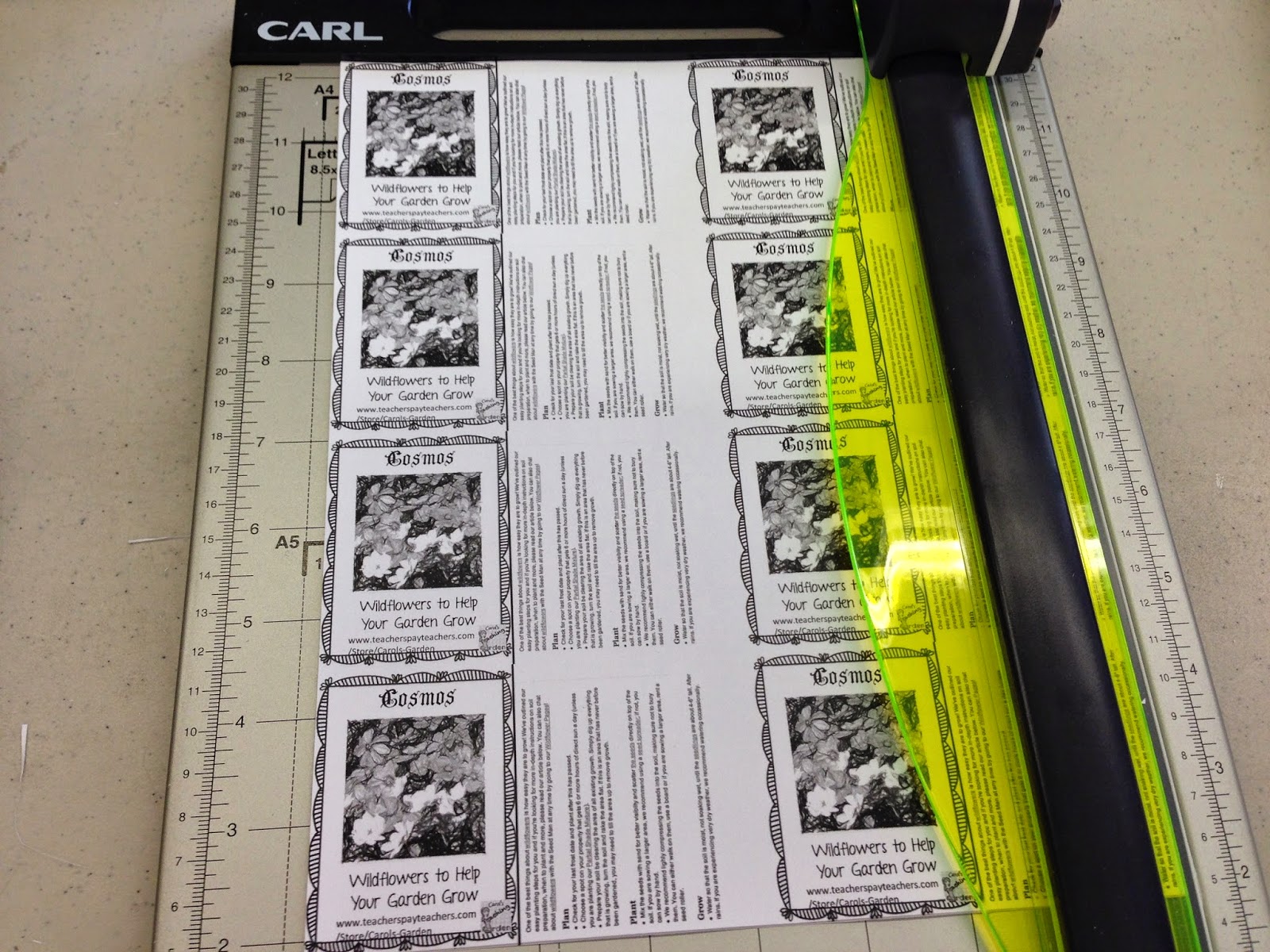
Next, I opened a new PowerPoint and inserted, then shrunk the new image. I copied and pasted it so that eight would fit on a page. I wanted to make certain that the folded inserts would fit into the 2” by 3” poly bags.


Although there are a few spots of color on these inserts, the color is not important to the overall design, and I wanted to save some money, so I printed 52 copies in black and white. That gave me slightly more than the 400 individual inserts I needed to fill the goodie bags, so that I wouldn’t worry about a few cutting mistakes.

When it came time, I cut out four sheets at once, using a small paper cutter that grips the paper as it cuts. (I didn’t want the slanted cut you so often get when making multiple cuts on a giant cutter.) 


Next, I sat on the couch watching T.V. while I folded each tiny slip of paper in half. The next evening I again sat on the couch watching T.V. while I inserted one folded piece of paper in each 2” by 3” poly bag.

On the final evening, I took all the bags to the dining room table, where I added 1/8 teaspoon of the wildflower seeds to each of the poly bags and sealed them. Whew!


The bags were filled, but I still had to attach my new business cards! I had never created my own business cards either, and I was really  nervous! Read about that next time, as I show you all the steps it took to create them. Until then!

Have a wonderful week!

post signature
Related Posts Plugin for WordPress, Blogger...